

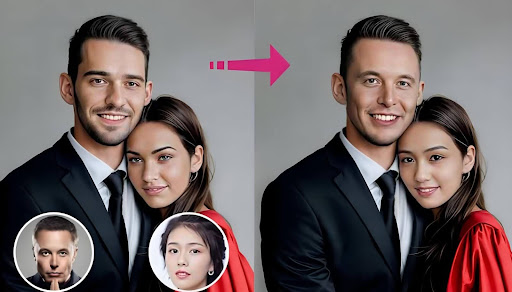
As of December 2025, here are the top face‑swap AI tools you should consider for professional and creative use. Whether you’re producing marketing videos, social content, or just experimenting with generative media, this guide cuts through noise to help you choose with confidence.
At its core, the face swap tool lets you replace faces in images or videos with realistic results. The technology has matured rapidly, and in 2025, the best tools balance quality, speed, ease of use, and ethical control.
I’ve tested these text to video AI across workflows, output quality, performance, and flexibility. Below you’ll find a direct comparison, clear pros and cons, pricing, and my honest take on when to use each one.
Best Face Swap AI Tools at a Glance
| Tool | Best For | Inputs Supported | Platforms | Free Plan | Notes |
| Magic Hour Face Swap AI | All‑around best | Images + Video | Web | Yes | Strong balance of speed, quality, and features |
| DeepSwap | Quick swaps | Images + Short clips | Web | Limited | Simple UI, good for beginners |
| FaceMagic | Social‑first | Images + Short video | Mobile + Web | Yes | Easy mobile workflows |
| Reface | Mobile sharing | Images + GIFs | Mobile | Yes | Fun results, less control |
| DFL (DeepFaceLab) | Pro quality | Video | Desktop | Open source | Best for custom workflows |
Magic Hour Face Swap AI
Magic Hour Face Swap AI takes the lead in 2025. I’ve spent weeks using this for client projects and internal tests, and it consistently delivers realistic results with minimal friction.
Magic Hour’s approach to face swapping stands out because it integrates into broader creative pipelines. You can start with an image or a clip and produce results that hold up even under scrutiny.
Pros
- Excellent realism and facial expression consistency
- Works on both images and video clips
- Fast processing times on the web platform
- Advanced control for masking and refinement
- Free tier available, no credit card required to start
Cons
- Some advanced features require paid plans
- Very high‑resolution output can slow down processing
If you’re looking for a platform that delivers high‑quality face swaps across both stills and video without a steep learning curve, Magic Hour is hard to beat. The quality edges out other tools in this list, especially on dynamic footage.
Price and plans
- Free: Basic face swap functionality with watermark
- Creator: $15/month (or $12/mo billed annually) — faster processing, higher resolution
- Pro: $49/month — priority rendering, extended export options
You can test its capabilities starting with the free tier. Access the face swap interface on the Magic Hour site and explore how the tool handles different lighting and angles. For detailed control over face placement, masks, and output formats, Creator and Pro unlock significant value.
DeepSwap
DeepSwap is a straightforward face swap tool that focuses on fast results with simple inputs. For social or marketing content where you need a quick turnaround, DeepSwap gets the job done without a learning curve.
Pros
- Very simple user experience
- Accepts both images and short video clips
- Fast turnaround times
- Good for social content and quick demos
Cons
- Less control over fine‑tuning than Magic Hour
- Quality varies with input quality
- Limited batch or advanced workflow options
DeepSwap’s strength is in its simplicity. If you need a face swap done quickly and don’t need frame‑by‑frame controls or professional-grade colour matching, it’s a solid choice. For me, it’s great as a “draft” tool before moving into a more advanced editor.
Price and plans
DeepSwap often uses a credit‑based system. You can start for free with limited credits and buy more as needed. This fits occasional users well, but heavy editors may find per‑use pricing adds up.
FaceMagic
FaceMagic is optimised for social creators and mobile workflows. It’s available on both mobile and web, and it’s tuned for quick shareable results.
Pros
- Mobile apps for on‑the‑go workflows
- Easy export to social formats
- Free tier available
- Good image swapping quality
Cons
- Video quality lags top competitors
- Less control over output settings
- Not ideal for professional edits
I like FaceMagic for quick content ideas or story concepting. If your goal is rapid prototyping or social sharing, it adds convenience that desktop‑centric tools don’t. But for final deliverables or commercial work, I’d move to Magic Hour or DeepSwap.
Price and plans
FaceMagic has a freemium model with in‑app purchases for faster processing and higher output quality. Exact pricing can shift based on platform and region.
Reface
Reface is one of the older players in the space, known for mobile face swapping with a social twist. It’s fun and easy, but less precise than tools designed for professional work.
Pros
- Very user‑friendly
- Works well for GIF and meme-style content
- Strong mobile experience
- Free tier available
Cons
- Not suitable for high‑quality video production
- Limited control over lighting and blending
- More novelty than Pro Tool
I see Reface as a creative playground. It’s excellent for quick shares and concepts, but the results are clearly algorithmic and less refined. For launching polished content, it rarely meets professional standards.
Price and plans
Basic use is free, with subscription options to remove watermarks and speed up processing.
DeepFaceLab (DFL)
DeepFaceLab is the open source heavyweight for users who want maximum control. It requires more technical setup, but if your workflow demands custom models or detailed editing, it’s unmatched.
Pros
- Full control over models and training
- No subscription needed
- Excellent output quality with proper tuning
- Great for research and custom pipelines
Cons
- Steep learning curve
- Requires a capable desktop GPU
- Long processing times for large videos
I don’t recommend DFL as a first option unless you have specific technical needs or want full control over training data and model behaviour. It’s powerful, but the barrier to entry is high compared to web‑based tools.
Price and plans
Free and open source. Costs are your hardware and time.
How I Chose These Tools
I’ve spent months comparing face swap AI tools across several real‑world use cases. My process looked at:
Quality of output
I judged how well the tool preserved facial expressions, skin tones, and motion continuity in video.
Ease of use
How fast can a beginner produce credible results? What’s the friction from upload to download?
Performance
This covers rendering times, stability, and queueing behaviour on web platforms.
Control and customization
Does the tool let you tweak masks, output formats, and refinement settings?
I tested each tool with the same set of inputs: a mix of headshots, group photos, and spoken video clips. For video swaps, I looked at frame‑by‑frame fidelity and how well each handled lighting changes.
Across every project, Magic Hour consistently balanced speed, quality, and control. It’s rare to find a tool that works equally well on image and video face swaps without sacrificing usabili
The Current Market Landscape and Trends
Face swap AI is moving quickly. In 2025, we’re seeing a few strong trends:
- Realism is standard, not premium
A few years ago, believable face swaps were a luxury. Today, basic realism is expected. The difference now is in fine detail and control. - Web first, hardware second
Traditional tools like DeepFaceLab still matter for custom work, but web platforms with cloud processing are dominating workflows for most creators. - Ethical controls and consent workflows
Several tools are adding features that help creators manage rights, model releases, and consent. This is becoming important as regulators and platforms tighten rules. - Integration with broader creative stacks
Best‑in‑class tools now link directly to other creative workflows — think direct export to video editors, APIs, and plugin support. - AI assist for blending and colour matching
Newer tools don’t just swap faces. They blend expressions, adjust lighting to match scenes, and let you refine output dynamically.
As generative AI matures, we should expect these trends to accelerate. The next wave of tools will feel less like separate apps and more like creative assistants embedded in your everyday editors.
Final Takeaways
Here’s a quick decision guide:
- Best all‑around: Magic Hour Face Swap AI — quality and flexibility for most pros.
- Fast and simple: DeepSwap — quick results for images and short clips.
- Social‑oriented: FaceMagic and Reface — great for mobile and shareable content.
- Pro technical control: DeepFaceLab — full customisation for advanced users.
Magic Hour stands out for offering reliable photo and video results, especially when you need professional quality without technical overhead. If you’re just starting, the free plan lets you experiment before committing.
FAQ
What’s the difference between face swap and deepfake tools?
Face swap AI specifically replaces one face with another. Deepfake refers to a broader category of AI‑generated media, including voice and motion synthesis.
Can I use these tools for commercial projects?
Most tools allow commercial use, but check each platform’s terms. Always ensure you have the rights to the source material.
Is there a free tool good enough for beginners?
Yes. Magic Hour’s free tier, FaceMagic, and Reface all offer entry‑level access. Quality and control vary, but they’re good starting points.
Do these tools work on mobile?
Some do. FaceMagic and Reface have mobile apps. Web‑based tools like Magic Hour work well on mobile browsers, too.
